01
Metal surfaces reduce reads
IT equipment, tools, machines, cabinets, and metal assets often require anti-metal tag construction.

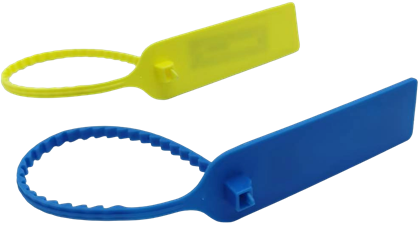
Use anti-metal RFID tags and RFID zip tie tags to identify fixed assets, IT equipment, office assets, and industrial equipment in inventory and loss-prevention workflows.
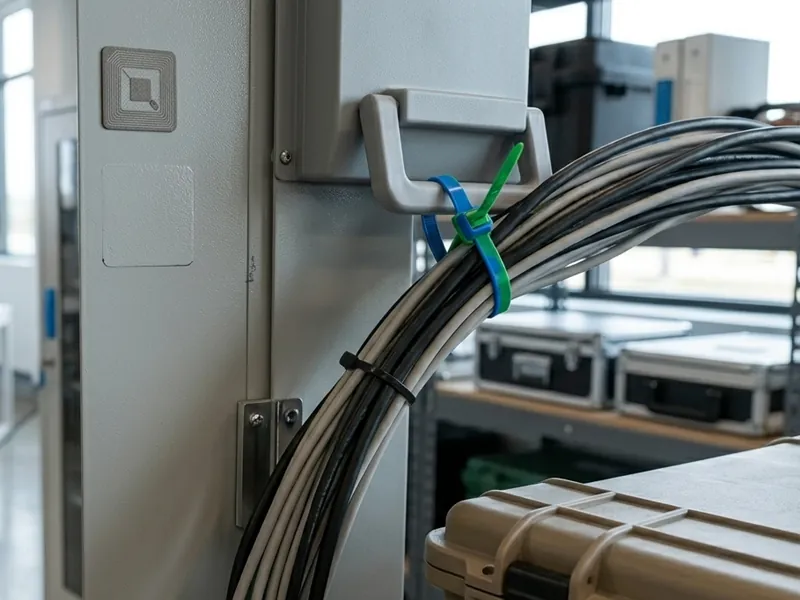
RFID asset tracking starts with choosing a tag that matches the asset surface, working environment, expected read distance, and attachment method. Many assets are made of metal or are installed near metal, which means standard labels may not read reliably. Other assets may require cable-tie mounting, removable tagging, adhesive mounting, or durable printed numbering. RFIDEcho supplies RFID anti-metal tags and RFID zip tie tags for asset tracking applications across factories, offices, warehouses, utilities, data centers, and industrial facilities. When used with RFID readers and asset management software, these tags help teams identify assets faster, reduce manual inventory work, and support loss-prevention records. The value of the page is tag recommendation: selecting the right material, chip, frequency, size, printing, encoding, and mounting method.
IT equipment, tools, machines, cabinets, and metal assets often require anti-metal tag construction.
Checking asset labels one by one can take too much time across offices, warehouses, and factories.
Some assets need adhesive tags, others need screw mounting, cable ties, or flexible labels.
Without serialized asset tags, missing equipment can be difficult to trace across departments or locations.
The right tag depends on surface material, read distance, durability, mounting method, and required printed or encoded identification.
RFIDEcho provides the RFID tags. The tags can work with compatible RFID readers and management software as part of your existing workflow.
Choose anti-metal, zip tie, adhesive, screw-mount, or flexible RFID tag formats based on the asset surface.
Print and encode asset number, EPC, QR code, barcode, department, or company logo.
Compatible RFID readers can identify tagged assets during inventory checks or location verification.
When used with management software, the tag ID helps support inventory, movement, audit, and loss-prevention records.
Use anti-metal RFID tags for laptops, servers, storage devices, network equipment, and metal racks.
Tagging pointIdentify printers, projectors, monitors, furniture, and shared office assets with durable RFID labels or ties.
Tagging pointTrack machines, molds, fixtures, tool carts, control boxes, and industrial assets exposed to metal surfaces.
Tagging pointUse RFID tags for cabinets, pipes, meters, poles, valves, and service equipment.
Tagging pointSupport annual or quarterly inventory checks with encoded tags and visible serial numbers.
Tagging pointCreate stronger identity records for assets that move between departments, sites, or users.
Tagging pointTell us your tagged object, material surface, reading workflow, environment, quantity, and printing or encoding requirements. We will help confirm a practical RFID tag configuration for your application.
RFID Tracking Tags vs Asset Tags: What's the Difference?
Compare RFID tracking tags and RFID asset tags with use-case tables, tag format mapping, a decision checklist, and RFQ guidance for asset tracking projects.
Read guide →Why Metal Asset Tracking Needs On-Metal RFID Tags
Learn why metal asset tracking requires on-metal RFID tags, how metal affects read range, and how to choose the right tag.
Read guide →How Much Do RFID Tags Cost? What Drives the Price
What sets RFID tag cost: construction tier, chip, material, encoding, and volume — plus reader and software costs, break-even volume, and how to get an accurate quote.
Read guide →RFID asset tracking is the use of RFID asset tags — such as anti-metal tags or zip tie tags — to give fixed assets, IT equipment, tools, and industrial equipment a unique electronic ID that can be scanned during inventory checks, audits, and loss-prevention reviews.
Metal is conductive, so a standard RFID tag placed directly on a metal surface has its antenna detuned and its read range reduced to near zero. Anti-metal RFID tags solve this with a built-in absorber or spacer layer, restoring reliable reads on steel cabinets, racks, and machinery.
It depends on the asset surface and attachment method — anti-metal tags mount directly on steel, aluminium, or other metal, while zip tie tags attach to cables, handles, or non-metal fixtures without an anti-metal layer. Many projects use both formats across different equipment types.
Yes — UHF anti-metal and zip tie tags can be read in bulk by handheld or fixed RFID readers, allowing many tagged assets in a room or rack to be counted in a single scan rather than checked one by one.
Yes. Asset tags can be printed with department codes, asset numbers, QR codes, barcodes, or company logos and factory-encoded with EPC, UID, or asset ID data to match your asset register format.
Slim PCB-based anti-metal tags as thin as a few millimetres are available for compact IT equipment, server racks, and tools where mounting space is limited, while larger epoxy-potted or ceramic variants suit bigger machinery and outdoor assets. Tell us your available mounting space and we will recommend a size.
"RFID asset label" and "RFID asset tag" are often used interchangeably, but a label usually means a thin adhesive-backed tag applied like a sticker, while a tag also covers harder-bodied formats such as anti-metal PCB, ceramic, or zip-tie construction. The right choice depends on the asset surface.
Tell us your requirements and we'll reply within 1 business day.